

Installation
Before you start
You should generate the following credentials from your Argmax Dashboard:
SECRET_API_TOKENto provision SDK access. This credential starts withaxst_.API_KEYto unlock the Pro features at runtime. This credential starts withax_.
This document is a step-by-step guide for integrating Argmax Pro SDK.
If you currently depend on Argmax Open-source SDK (e.g. WhisperKit), you will need to remove that dependency before you start.
Step 1: Set up SDK Access
Argmax Pro SDK Swift is delivered through Argmax's authenticated private Swift Package Manager (SwiftPM) registry.
You will need to execute two commands in your Terminal in order to set up your access.
Set up registry
swift package-registry set --global --scope argmaxinc https://api.argmaxinc.com/v1/sdkUpon successful completion, your ~/.swiftpm/configuration/registries.json should look like this:
{
  "authentication": {},
  "registries": {
    "argmaxinc": {
      "supportsAvailability": false,
      "url": "https://api.argmaxinc.com/v1/sdk"
    }
  },
  "version": 1
}Authenticate
swift package-registry login https://api.argmaxinc.com/v1/sdk/login --token <SECRET_API_TOKEN>If you observe the following please reach out to Argmax:
Error: registry login using https://api.argmaxinc.com/v1/sdk/login failed: missing or invalid authentication credentialsUpon successful completion, you should see the following message in your Terminal:
Login successful.
Credentials have been saved to the operating system's secure credential store.
Registry configuration updated.and your ~/.swiftpm/configuration/registries.json should look like this:
{
  "authentication": {
    "api.argmaxinc.com": {
      "loginAPIPath": "/v1/sdk/login",
      "type": "token"
    }
  },
  "registries": {
    "argmaxinc": {
      "supportsAvailability": false,
      "url": "https://api.argmaxinc.com/v1/sdk"
    }
  },
  "version": 1
}You may need to restart Xcode for changes to take effect.
Step 2: Add Argmax Pro SDK
If you are using the Package.swift file method, please add the following to that file:
dependencies: [
    .package(id: "argmaxinc.argmax-sdk-swift", upToNextMajor: "3.0.6"),
    ...
 ],
 ...
 targets: [
    .target(
        name: "YourTargetName",
        dependencies: [
	        .product(name: "Argmax", package: "argmaxinc.argmax-sdk-swift")
	      ],
...Note that upToNextMajor will subscribe to minor and patch updates, e.g.
upToNextMajor: "3.0.6" may resolve to 3.1.0 if the most recently published
Argmax SDK with a major version of 3 is 3.1.0.
You may list all published versions of argmax-sdk-swift and argmax-sdk-swift-alpha with the following command in Terminal:
curl https://api.argmaxinc.com/v1/sdk/argmaxinc/argmax-sdk-swift{-alpha} -H "Authorization: Bearer SECRET_API_TOKEN" | jqThe CHANGELOG is accessible when you are logged in under this page. It is also viewable in Xcode as part of the SDK.
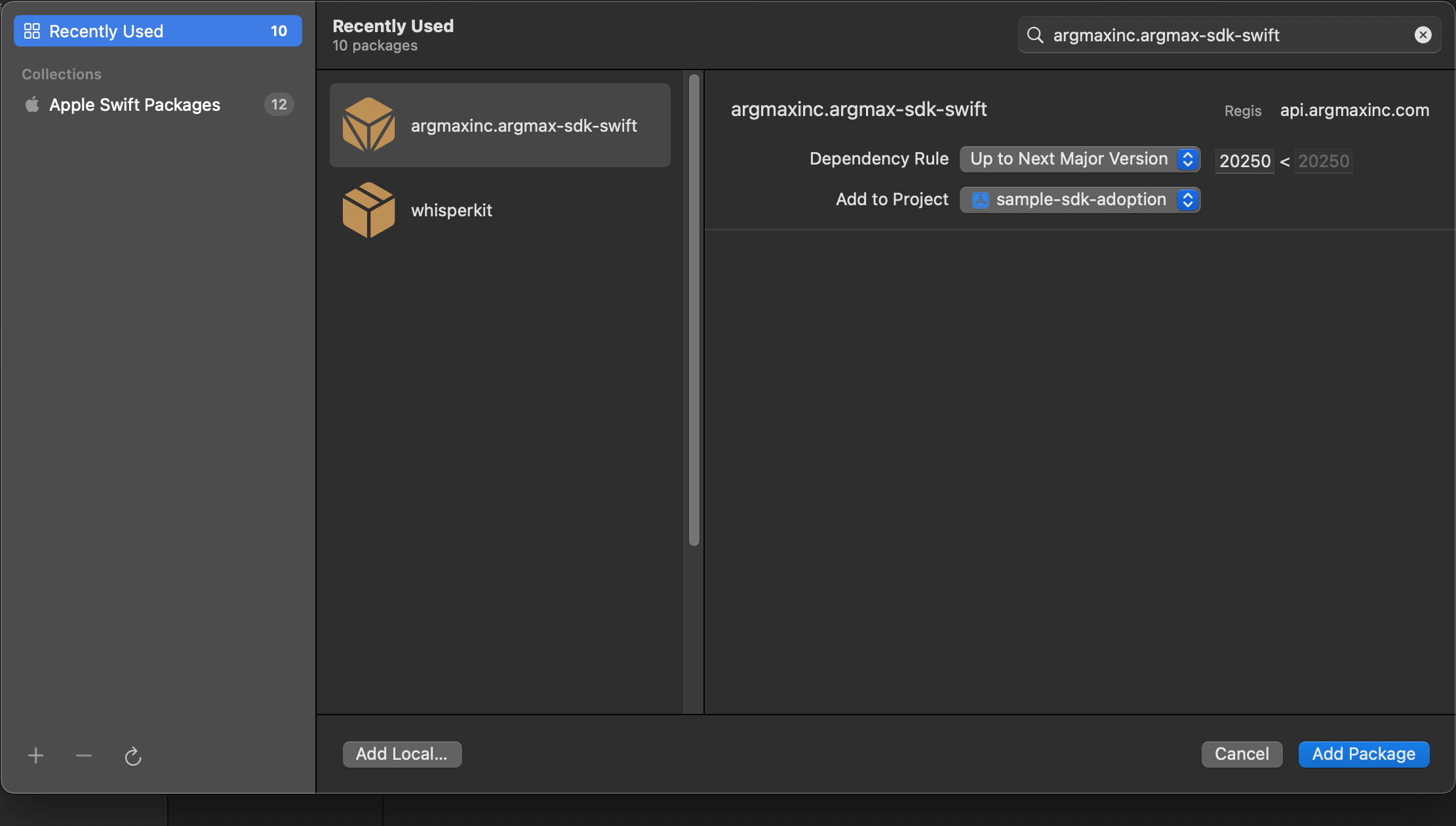
If you are using an Xcode project, go to Package Dependencies > Add Package Dependencies and enter argmaxinc.argmax-sdk-swift in the Search or Enter Package URL field on the top right corner:
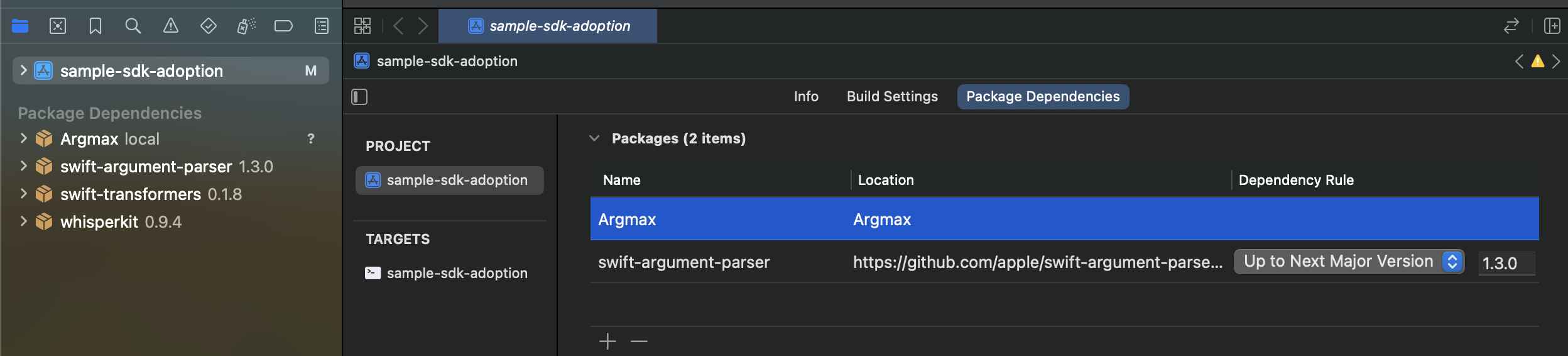
After updating Package.swift or Xcode project, the Argmax package should appear along with the open-source dependencies (e.g. WhisperKit and swift-transformers) similar to the screenshot below:
Alpha channel. If you want early-access to pre-release SDK versions that are still under testing, you can replace "argmaxinc.argmax-sdk-swift" with "argmaxinc.argmax-sdk-swift-alpha".
You should never ship your application while depending on "argmaxinc.argmax-sdk-swift-alpha", it is only useful for early access testing and prototyping to accelerate development.
Step 3: Initialize SDK
In order to unlock Pro features, you will first need to use your API key to initialize the SDK as follows:
import Argmax
...
let myAPIKey: String = "ax_..."
await ArgmaxSDK.with(ArgmaxConfig(apiKey: myAPIKey))Please verify that your API key starts with ax_ and has exactly 34 characters. This key will be used to communicate with https://api.argmaxinc.com in order to verify the state of your subscription and provision a license for each device. Deidentified inference performance metrics will also be communicated as per argmaxinc.com/privacy.
Network requirements
Please see Managing Server Traffic for details on network traffic requirements.